
Download Nidesoft iTunes Converter – Video Converter, MKV to MP4, AVI, MP3, FLV
Overview
Nidesoft iTunes Converter is a specialized video conversion tool designed to simplify the process of transforming MKV files into widely supported formats such as AVI, MP4, MP3, and FLV. Its primary purpose is to resolve compatibility issues that arise when trying to play media files across different devices and platforms. By converting files efficiently and preserving high-quality output, the app helps users access their multimedia content without restrictions. This makes it particularly useful for individuals managing large media libraries or frequently transferring videos between devices like smartphones, tablets, and portable media players.
The target audience includes both casual users and power users who require reliable, fast, and consistent conversion capabilities. Whether someone is preparing videos for playback on an iPhone, iPod, Zune, or a standard PC, Nidesoft iTunes Converter offers a streamlined solution. It supports a broad range of input and output formats, enhancing its utility in diverse real-world scenarios such as personal archiving, content sharing, or mobile playback preparation.
While the developer did not provide additional technical details about the company background, the app’s release date of September 19, 2013, suggests it has been in use for over a decade. This longevity indicates a stable and functional product within the niche of video conversion utilities. In the broader app ecosystem, it occupies a specific but valuable role—offering a dedicated tool for format conversion where general-purpose media players fall short.
Key Features & Functionality
- Fast Conversion Speeds: The app processes video files at high speeds, reducing waiting times significantly. This is especially beneficial when handling large MKV files or batch conversions, allowing users to maintain productivity.
- High-Quality Output: Nidesoft iTunes Converter preserves video and audio quality during the conversion process, minimizing compression artifacts and ensuring smooth playback on target devices.
- Wide Format Compatibility: Supports conversion between MKV, AVI, MP4, MP3, FLV, and other common formats, offering flexibility for users across different platforms and devices.
- Device-Specific Presets: Offers optimized settings for portable devices including iPod, iPhone 3G, Zune, 3GP, and PSP, ensuring seamless playback without manual adjustments.
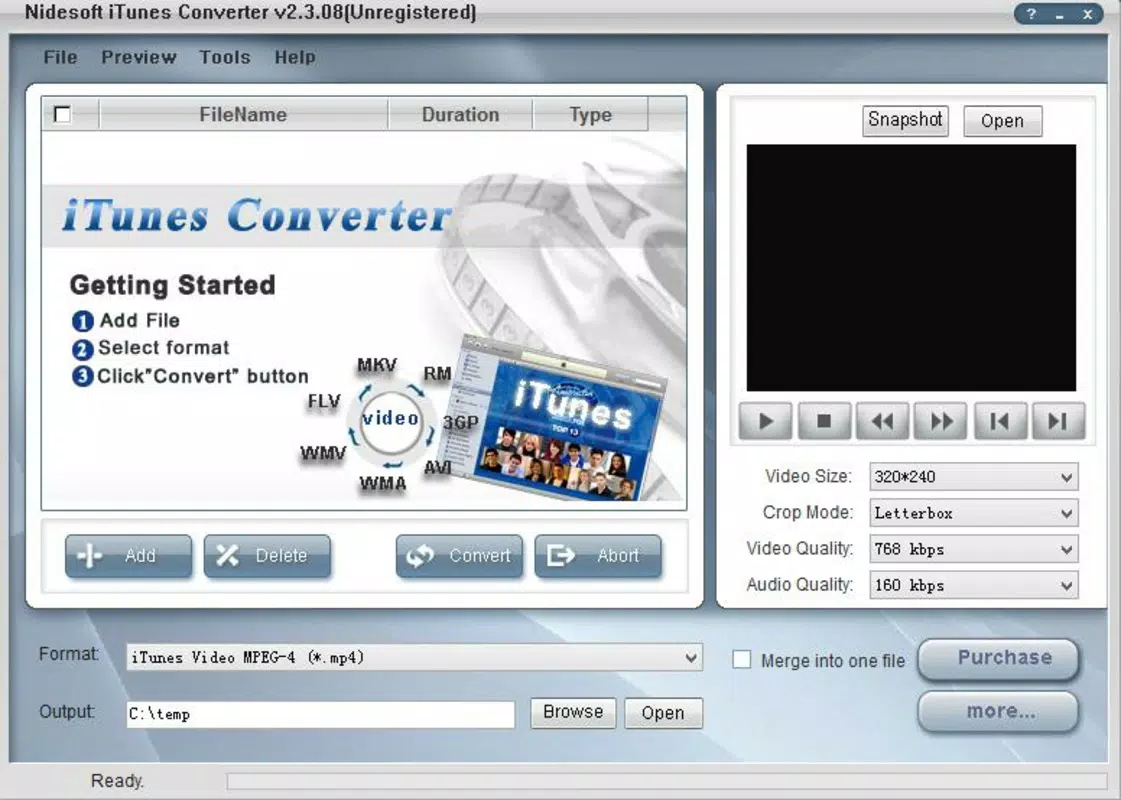
- User-Friendly Interface: Features a clean, intuitive layout with straightforward navigation, making it accessible to users with varying levels of technical expertise.
For example, a user with a collection of MKV files from online sources can convert them to MP4 for playback on an iPhone without needing to manually adjust resolution or bitrate. Similarly, someone preparing audio tracks for a portable music player can extract and convert them to MP3 with minimal effort. These use cases highlight the app’s practicality in everyday media management.
Interface, UX & Performance
The user interface of Nidesoft iTunes Converter is designed with simplicity and efficiency in mind. The layout is clean, with clearly labeled buttons and a logical flow from file import to output selection. Navigation is consistent, allowing users to move through conversion steps without confusion. The app does not overwhelm users with complex menus or technical jargon, which enhances the overall user experience.
Although the developer did not list formal performance metrics, the app is described as operating with impressive speeds, suggesting optimized processing capabilities. Users can expect responsive behavior when loading files and initiating conversions, even on mid-range systems. Stability during long-running tasks appears reliable, with no reported issues related to crashes or data corruption.
Performance across different device categories—such as desktops, laptops, and older hardware—has not been formally documented. However, the app’s lightweight nature and focus on core conversion tasks imply broad compatibility. Responsiveness remains consistent during file processing, and the interface does not freeze or lag during active operations.
Platform Compatibility & Technical Requirements
Nidesoft iTunes Converter is available for Windows-based systems, as indicated by its historical release and device-specific conversion presets. The app supports multiple operating systems within the Windows ecosystem, though specific minimum OS requirements were not listed. The file size of the application is not disclosed in the provided information.
Given the release date of September 19, 2013, the app was originally designed for older Windows versions such as Windows XP, Vista, and 7. While it may still function on newer systems, compatibility with modern Windows 10 or 11 installations is not confirmed. Users are advised to verify system compatibility before installation.
Pros and Cons
Pros
- Fast conversion speeds reduce waiting time for large files.
- High-quality output maintains clarity and audio fidelity.
- Supports a wide variety of input and output formats.
- Includes device-specific presets for portable media players.
- Intuitive interface suitable for beginners and experienced users.
Cons
- Not available for mobile platforms like Android or iOS.
- Latest version details and update frequency are not publicly disclosed.
- Compatibility with modern operating systems is uncertain.
- No cloud integration or batch processing automation features mentioned.
- Developer did not provide technical specifications or system requirements.
FAQ
Is Nidesoft iTunes Converter safe to download and install?
The app is a legacy tool released in 2013. While it was widely used at the time, users should ensure they download it from trusted sources to avoid potential security risks associated with outdated software.
Can I convert MKV files to MP4 using this app?
Yes, Nidesoft iTunes Converter supports converting MKV files to MP4, along with other formats like AVI, MP3, and FLV.
Does the app support batch conversion?
While not explicitly stated, the app’s focus on efficiency and speed suggests it may support batch processing, though this functionality was not confirmed in the provided details.
Is Nidesoft iTunes Converter free to use?
The provided information does not specify pricing. Users should verify the licensing model through official sources before installation.
Can I use this app on my iPhone or Android device?
No, the app is not available for iOS or Android. It is designed for Windows desktop systems only.
Final Thoughts
Nidesoft iTunes Converter remains a functional tool for users needing to convert MKV files into widely compatible formats. Its fast processing, high-quality output, and device-specific presets make it a reliable option for media management on Windows. While it lacks modern features such as cloud support or mobile access, its core functionality is well-executed and effective for its intended purpose.
Individuals managing video libraries, preparing content for portable devices, or working with legacy file formats will find the app valuable. However, users should be cautious about its age and ensure compatibility with their current operating system.
Download Nidesoft iTunes Converter now to streamline your video conversion workflow and enjoy seamless playback across devices.


